Viral 🔥
9:16
Navratri Devotion AI Prompt: Realistic Durga Puja Portrait
Tested photorealistic prompt engineered for Google Gemini, ChatGPT 4o, and Midjourney v6. Generates high-attitude portraits with authentic cinematic lighting and natural texture.
📋 Ready-to-Copy Master Prompt
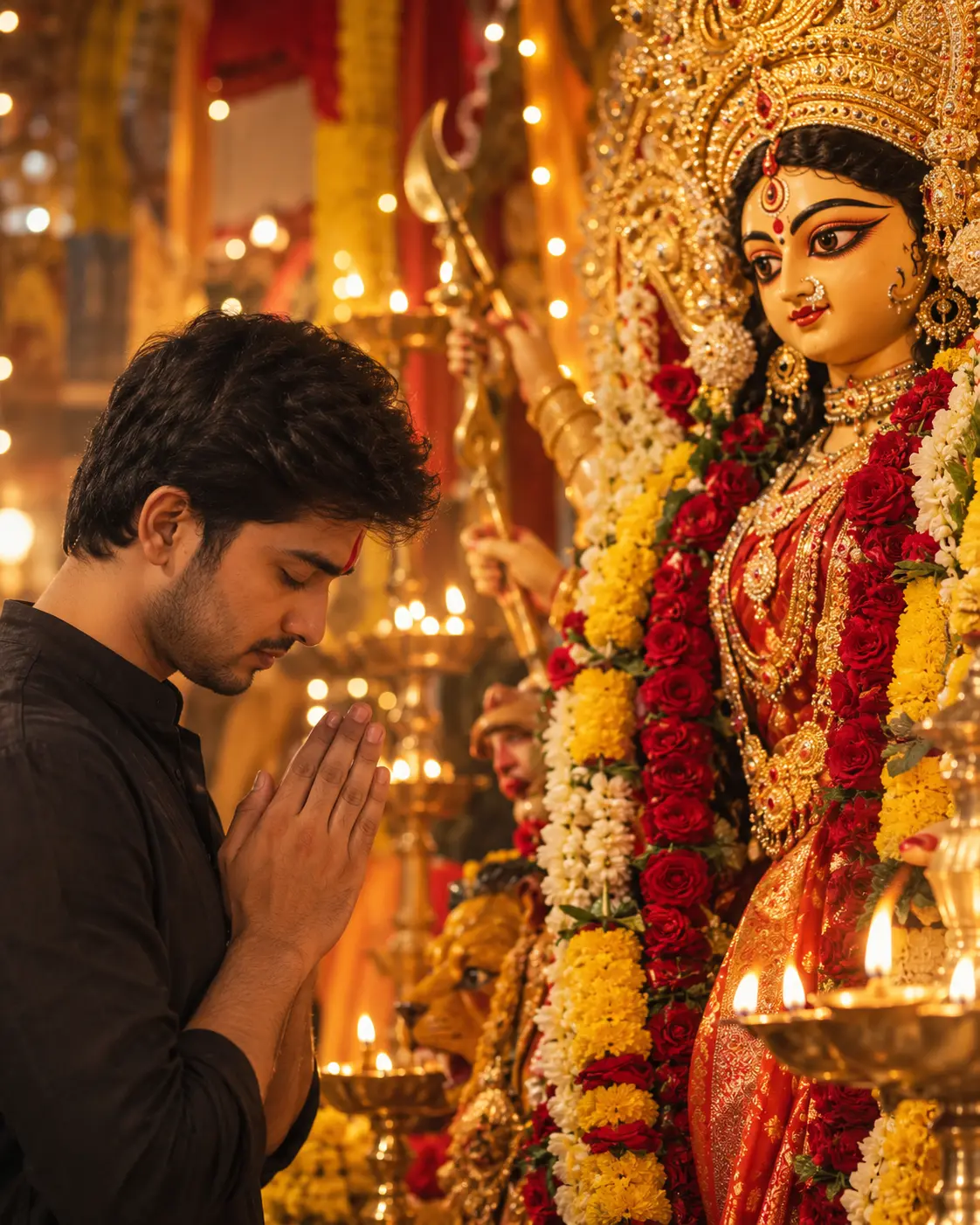
Full-frame 50mm editorial photograph of a young South Asian man in his mid-20s bowing his head in deep devotion before a majestic, handcrafted Goddess Durga idol during Navratri. The man stands in the left foreground in a close three-quarter profile, wearing a simple black cotton kurta with natural fabric folds and a vivid red vermilion tilak on his forehead. His hands are joined in a serene Namaste gesture at chest level, eyes closed with a peaceful devotional expression. To the right, a grand traditional Durga idol fills the frame, featuring expressive hand-painted eyes, a divine expression, an ornate golden crown (Mukut), elaborate traditional jewelry, and a crimson-and-gold silk sari. Thick garlands of fresh red roses, yellow marigolds, and white jasmine surround the deity. The setting is an authentic Durga Puja pandal illuminated by glowing brass oil lamps (diyas) and warm ambient festive lights creating a soft bokeh background. 4:5 vertical portrait composition, shallow depth of field (f/2.2), natural skin texture with visible pores, subtle film grain, warm amber color grading, photorealistic lighting.*
🛡️ Negative Shield / Avoid
cartoon, 3D render, anime, smooth plastic skin, exaggerated eyes, malformed hands, extra fingers, distorted limbs, oversaturated colors, harsh digital HDR, artificial CGI textures, modern synthetic decorations.*
⚙️ Recommended Render Settings
Target AI Model
Gemini & ChatGPT
Aspect Ratio
9:16 (Vertical)
Lighting Style
Dramatic Rim / Split Light
Lens Emulation
85mm f/1.4 Medium Format
Customize in Master Studio
Want to switch outfits, change backdrops, or boost cinematic lighting? Use the Master Refiner tool.
🚀 How to Use this Prompt in 3 Simple Steps
1
Copy the Prompt
Click the green Copy Master Prompt button above to save the tested prompt to your clipboard.
2
Paste in Google Gemini or ChatGPT
Open Google Gemini (gemini.google.com) or ChatGPT 4o and paste the prompt directly into the prompt bar.
3
Generate & Download in 4K
Hit Enter. You will receive 4 ultra-sharp portrait variations with photorealistic lighting ready for DP or social media.
More Viral Festival & Ethnic Prompts
Explore all in Festival & Ethnic →
Frequently Asked Questions
For optimal photorealism in Google Gemini, ensure you are using Gemini Advanced with Imagen 3. Imagen 3 preserves authentic skin pores, avoids the plastic airbrushed look, and correctly renders lighting and textiles like leather and silk.
Yes! Simply edit the opening sentence (e.g. change "young man" to "28-year-old man with beard" or change the outfit color). The camera lenses and lighting directives at the end of the prompt will maintain the high editorial quality.
Negative prompts instruct AI models to suppress common artefacts like cartoon smoothing, extra fingers, overexposure, and blurry eyes, resulting in pristine magazine-grade output.
Yes, all curated prompts on HowToWritePrompt.in are 100% free to copy, customize, and use for personal or commercial projects.