Most Loved 💫
9:16
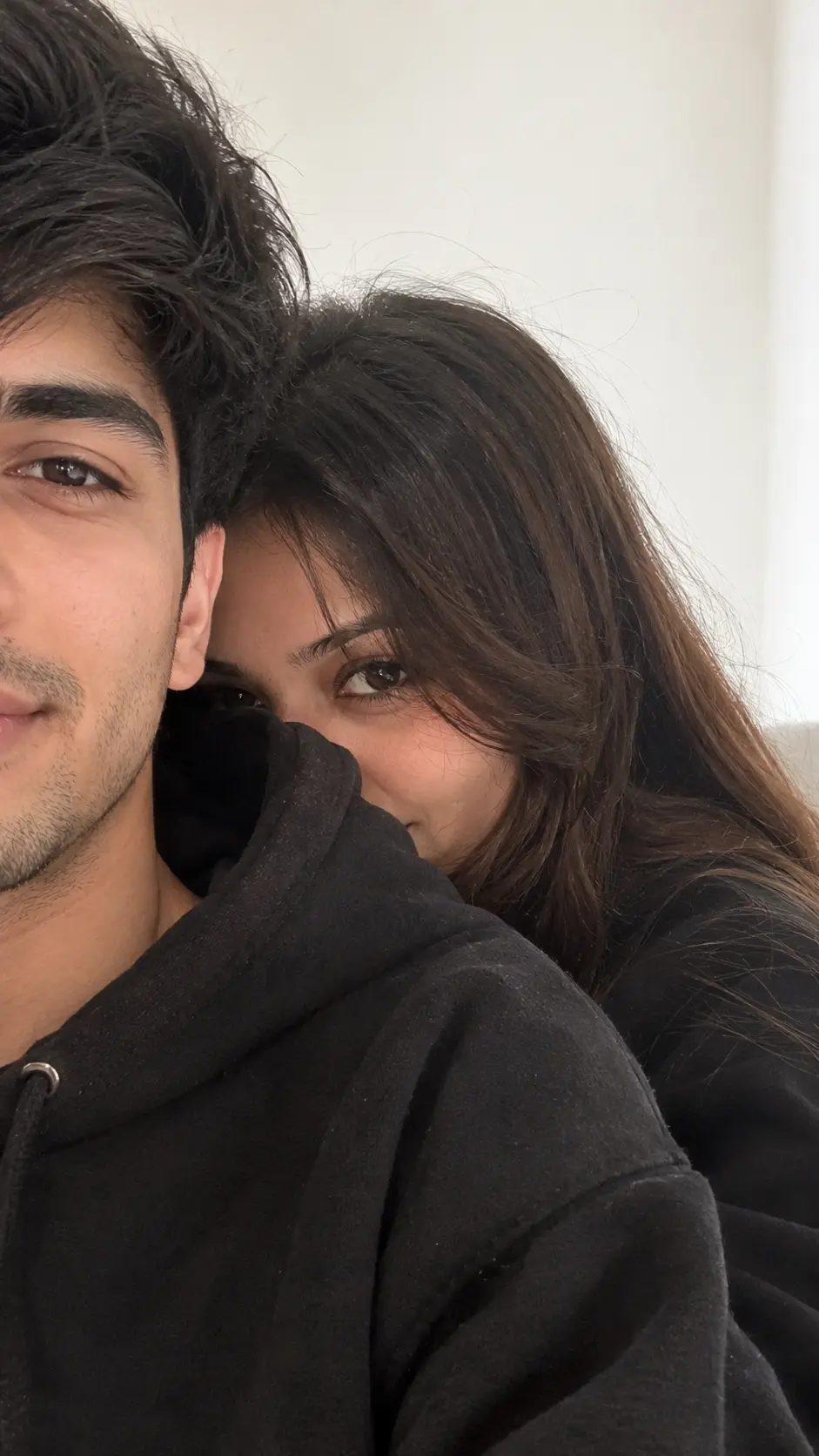
Shy Couple Selfie ✨ | Oversized Black Hoodie Instagram Prompt
Tested photorealistic prompt engineered for Google Gemini, ChatGPT 4o, and Midjourney v6. Generates high-attitude portraits with authentic cinematic lighting and natural texture.
📋 Ready-to-Copy Master Prompt
Aspect ratio 9:16. Use the uploaded couple photos as the ONLY identity references, one photo per person. Preserve both people 100% unchanged: exact facial identity, facial features, hairstyle, skin tone, body proportions and natural appearance. Do not blend or swap their faces. Do not beautify, reshape, smooth or alter their identities. Ultra-realistic 8K detail.
Ultra-realistic casual close-up couple selfie. Only half of the young man's face is visible on the left side of the frame, with a calm, relaxed expression, thick dark hair and natural strong eyebrows. The woman shyly hides behind his shoulder, showing only half of her face, with one expressive eye clearly visible and a subtle, mysterious gaze. She has long silky dark-brown hair with soft curtain bangs and natural long eyelashes.
Outfit: both wear oversized black hoodies.
Setting: clean, minimal white indoor background, cozy and intimate atmosphere.
Lighting: soft natural daylight, slightly overexposed highlights, gentle soft shadows, natural colors.
Camera: authentic candid smartphone selfie look, close-up framing, 35mm feel, shallow depth of field, soft background bokeh, subtle natural camera softness.
Style: premium Instagram aesthetic, realistic skin pores and natural skin texture, individual hair strands, photorealistic, clean and noise-free.
🛡️ Negative Shield / Avoid
altered identity, changed face, swapped faces, blended faces, beautification, plastic skin, distorted facial features, extra eyes, extra limbs, extra fingers, unrealistic hair, CGI, cartoon, excessive blur, oversaturation, watermark, text, low quality
⚙️ Recommended Render Settings
Target AI Model
Gemini & ChatGPT
Aspect Ratio
9:16 (Vertical)
Lighting Style
Dramatic Rim / Split Light
Lens Emulation
85mm f/1.4 Medium Format
Customize in Master Studio
Want to switch outfits, change backdrops, or boost cinematic lighting? Use the Master Refiner tool.
🚀 How to Use this Prompt in 3 Simple Steps
1
Copy the Prompt
Click the green Copy Master Prompt button above to save the tested prompt to your clipboard.
2
Paste in Google Gemini or ChatGPT
Open Google Gemini (gemini.google.com) or ChatGPT 4o and paste the prompt directly into the prompt bar.
3
Generate & Download in 4K
Hit Enter. You will receive 4 ultra-sharp portrait variations with photorealistic lighting ready for DP or social media.
More Viral Love Prompts Prompts
Explore all in Love Prompts →
Frequently Asked Questions
For optimal photorealism in Google Gemini, ensure you are using Gemini Advanced with Imagen 3. Imagen 3 preserves authentic skin pores, avoids the plastic airbrushed look, and correctly renders lighting and textiles like leather and silk.
Yes! Simply edit the opening sentence (e.g. change "young man" to "28-year-old man with beard" or change the outfit color). The camera lenses and lighting directives at the end of the prompt will maintain the high editorial quality.
Negative prompts instruct AI models to suppress common artefacts like cartoon smoothing, extra fingers, overexposure, and blurry eyes, resulting in pristine magazine-grade output.
Yes, all curated prompts on HowToWritePrompt.in are 100% free to copy, customize, and use for personal or commercial projects.