Gemini Prompts
Monsoon Nights Mumbai – Premium Cinematic City Tourism Poster
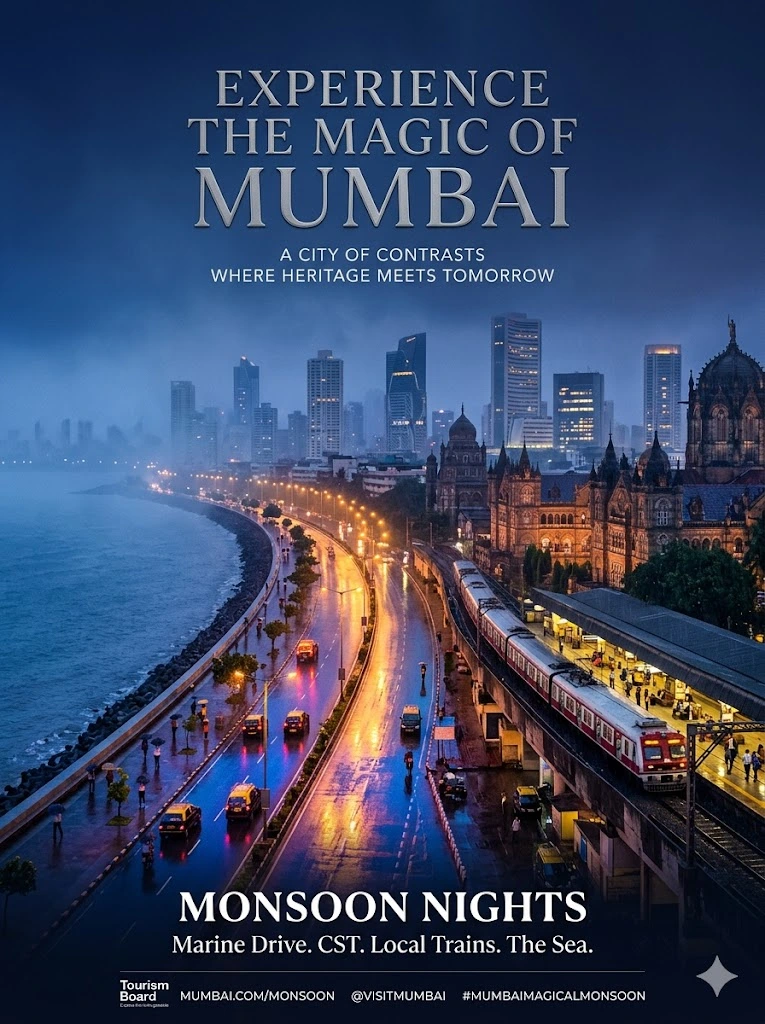
Prompt Overview
Create a luxury 3:4 city branding poster showcasing the magical atmosphere of Mumbai during monsoon nights. Featuring Marine Drive's glowing Queen's Necklace, rain-soaked streets, local trains, colonial architecture, Arabian Sea mist, vibrant nightlife, and modern skyscrapers, this prompt generates a cinematic tourism campaign poster with premium typography, elegant negative space, and a sophisticated palette of deep blues, warm amber lights, and neon reflections. Perfect for travel branding, city promotion, tourism marketing, editorial design, and high-end urban campaign visuals
Copy-Paste Prompt Template
Editable BelowCreate a premium 3:4 city tourism campaign poster with the theme:
"{CITY_THEME}"
The overall design should feel like a luxury city branding campaign featured in an international design annual, not a generic travel advertisement.
Show the most iconic elements of {CITY_NAME}: {LANDMARKS}, {TRANSPORT}, {ARCHITECTURE}, {STREET_LIFE}, and {NATURAL_FEATURES}. Capture the unique atmosphere of the city during {TIME_OF_DAY} with cinematic lighting, realistic weather effects, and authentic urban details.
Use modern professional typography and include:
"{MAIN_TITLE}"
"{CITY_NAME}"
"{KEYWORD_1} / {KEYWORD_2} / {KEYWORD_3} / {KEYWORD_4} / {KEYWORD_5} / {KEYWORD_6}"
Maintain balanced visual hierarchy, premium negative space, editorial-quality layout, and high-end tourism campaign aesthetics.
Color palette: {COLOR_PALETTE}
Mood: {MOOD}
Style: luxury city branding poster, world-class tourism campaign, cinematic photography, ultra-detailed, realistic lighting, atmospheric depth, award-winning graphic design, premium typography, magazine-quality composition, 8k resolution.
Need to remix or generate variations of this prompt?
Load this prompt directly into our interactive workspace to tweak parameters, generate variations, or change styles with AI.
Open in Prompt Editor
Published by sushil joshi
I am a Prompt Engineer and Web Developer passionate about building AI-powered tools, crafting effective prompts, and developing modern, user-friendly web applications. I enjoy combining artificial intelligence with web technologies to create innovative solutions that improve productivity and user experience.