
Introduction
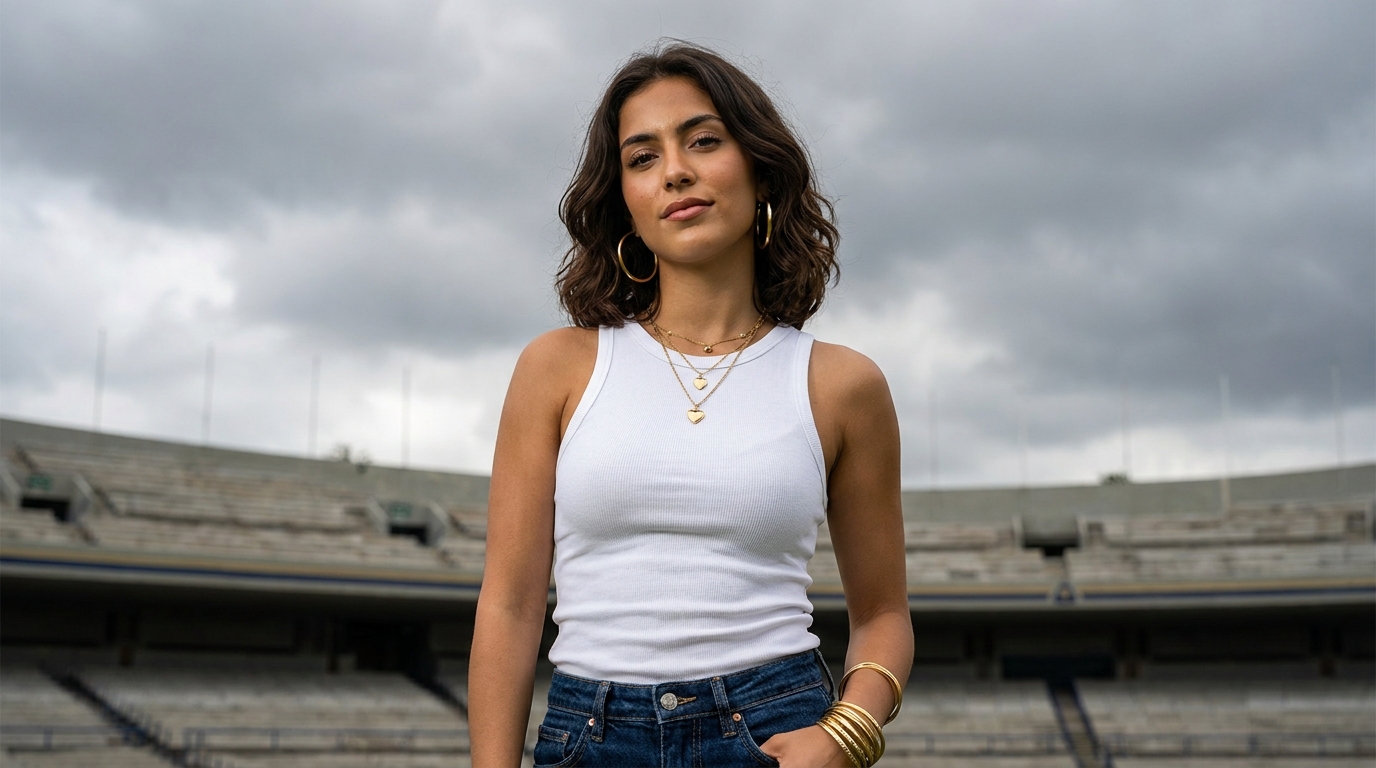
Generating a picture of a face using AI is simple, but creating a high-end, photorealistic fashion editorial portrait requires technical precision. When treating a prompt as a professional engineering case study, we must think like a creative director.
In this guide, we will analyze a dynamic portrait prompt that uses variables for location and clothing. We will explore how to upgrade this prompt by applying real-world camera mechanics, lighting psychology, and model-specific optimizations to ensure the final output looks like it belongs on the cover of a luxury fashion magazine.
Original Dynamic Portrait Prompt Analysis
What the Prompt Does Well
This prompt is highly structured. It clearly defines the subject's physical traits, specific jewelry layering (gold hoops, heart pendants), and styling. The use of dynamic variables (
and
) makes this an excellent template for a prompt generation tool. Furthermore, specifying "dramatic overcast skies" and "soft natural light" gives the AI excellent environmental lighting cues.
Missing Elements That Limit Output Quality
Despite its strengths, the prompt lacks technical photography instructions. Without specifying a camera lens, aperture, film stock, or negative prompts, the AI might generate an image that looks "too perfect" or distinctly computer-generated (the "plastic" AI look).
Prompt Engineering Audit: The Scorecard
Original Prompt Evaluation Score
| Category | Score |
|---|---|
| Subject Clarity | 9/10 |
| Styling & Wardrobe | 9/10 |
| Lighting Setup | 8/10 |
| Camera Engineering | 4/10 |
| Model Compatibility | 7/10 |
| Overall Score | 7.4/10 |
Reasoning: The styling and subject details are exceptionally strong. However, the lack of camera specifics (like an 85mm lens) and negative prompts holding back the photorealism drops the overall score.
Visual Psychology & Lighting Engineering
Every element in a professional prompt should have a psychological purpose. Let's break down the choices:
- Overcast Skies & Soft Natural Light: Overcast clouds act as a massive natural softbox. This diffuses harsh shadows, creating flattering, even lighting on the subject's olive skin.
- Gold Jewelry vs. Overcast Skies: The warmth of the gold jewelry provides a striking, luxurious contrast against the cool, moody, and dramatic grey background of the overcast stadium.
- The Empty Stadium: Using a massive empty location creates a sense of scale, isolation, and quiet confidence, drawing the viewer's eye entirely to the subject.
Camera Engineering: Choosing the Right Lens
If you were shooting a cityscape, a 24mm wide-angle lens would be perfect. However, for a fashion portrait, wide angles distort facial features. A professional prompt engineer must act like a photographer:
We need to add an 85mm lens instruction. An 85mm lens compresses the background, pulling the expansive stadium closer while keeping the subject's proportions natural. Adding an aperture of f/1.8 or f/2.8 will ensure the subject is perfectly sharp while the stadium background melts into beautiful, cinematic bokeh.
The Final Evolution: Agency-Level Premium Prompts
To maximize photorealism, we will introduce camera engineering, film stock references (like Kodak Portra 400 for natural skin tones), and negative prompts. Here are the upgraded versions optimized for modern AI models.
1. Midjourney Optimized Version (v6)
Note: Replace the bracketed variables with your desired inputs.
2. ChatGPT (DALL-E 3) & Flux Optimized Version
Final Prompt Engineering Lessons
Great portrait prompts require more than just describing a person. By combining wardrobe styling, dynamic variables, specific camera focal lengths, and strategic lighting conditions, you can elevate a basic AI generation into a commercial-grade photograph. Using dynamic variables like
and
turns a single prompt into an infinitely reusable tool for creating diverse visual assets.
Frequently Asked Questions About AI Portrait Prompts
How do I make AI portraits look photorealistic?
To achieve photorealism, you need to specify camera lenses (like an 85mm lens), lighting conditions (like overcast skies or softbox lighting), and film stock (like Kodak Portra 400). Requesting "natural skin texture" or "subtle pores" also prevents the plastic AI look.
What are dynamic variables in AI prompts?
Dynamic variables are placeholders like
Why is overcast lighting good for portrait photography?
Overcast skies act like a giant natural softbox, diffusing harsh sunlight. This creates soft, flattering shadows on the subject's face, avoiding blown-out highlights and making it ideal for fashion and beauty editorial portraits.